

Generating embed URLs is available on Voyager and Enterprise plans. Learn more about our plans and pricing.
Embeds use iframes and don’t provide access to Rive’s runtime APIs. If you need to control or interact with your Rive programmatically, use a Rive runtime instead.
Creating an embed URL
1
Open the Embed URL dialog
In the Rive editor, click the main menu in the top-left corner and select Generate Embed URL.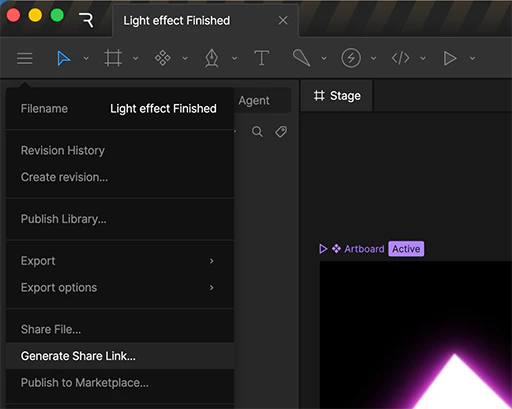
2
Generate your link
In the dialog that appears, choose the artboard and state machine or timeline animation to display, and click Generate Link.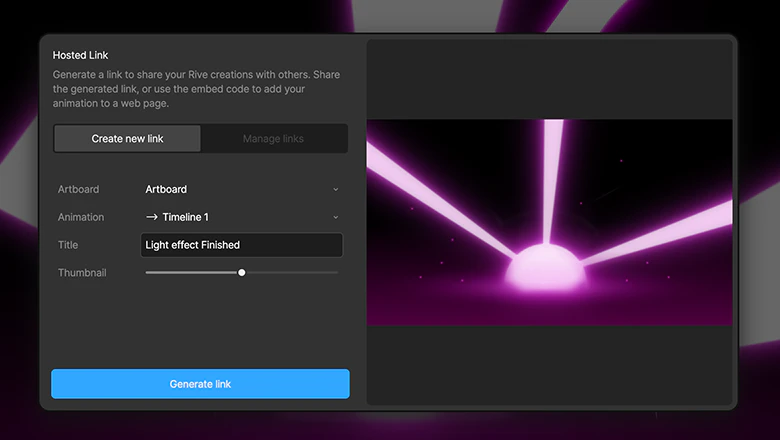
3
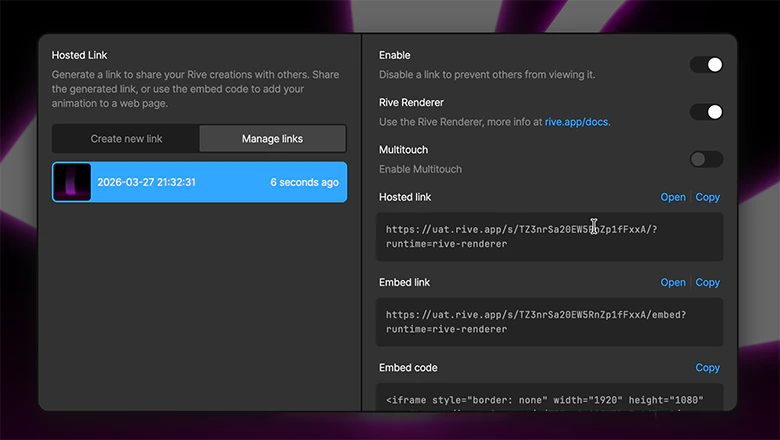
Set your options
- Enable — Turn the link on or off to control access.
- Rive Renderer — Use the Rive Renderer (recommended) or Canvas renderer.
- Multi-touch — Enable support for multi-touch interactions.
Certain features, such as Vector Feathering, are only available using the Rive Renderer. See our Feature Support page for more information.
4
Choose a link type
Select the option that best fits how you plan to use your file.
For more information on using embed URLs with tools like Framer, Webflow, and Notion, see Integrations.
- Hosted link — Opens your file on a dedicated Rive page with a framed viewer. Ideal for sharing with clients or stakeholders.
- Embed link — Displays your file without the surrounding Rive UI. Useful for platforms that automatically preview links, such as Notion and Telegram.
- Embed code — An iframe snippet for embedding your file into sites where you can edit HTML, such as WordPress.
- Framer code (Deprecated) — See the new official Rive Framer Plugin.