> ## Documentation Index
> Fetch the complete documentation index at: https://rive.app/docs/llms.txt
> Use this file to discover all available pages before exploring further.

# Unit Testing

> Write and run unit tests for your Util Scripts using Test scripts.

export const Demos = ({examples, runtime, columns = 2, children, childrenIndex = 0, learnByExample = false}) => {
  const examplesData = {
    ikConstraint: {
      title: 'IK Constraints',
      description: 'Check out this example to see IK constraints in action.',
      image: "https://static.rive.app/docs/ik-constraint.gif",
      stateMachines: "State Machine 1",
      links: {
        editor: "https://rive.app/community/files/28080-53039-ik-constraint/"
      }
    },
    cachingARiveFile: {
      title: 'Caching a Rive File',
      description: 'Load the .riv into memory once, use it multiple times.',
      riv: 'https://static.rive.app/rivs/rives_animated_emojis.riv',
      stateMachines: "State Machine 1",
      artboard: "Emoji_package",
      links: {
        web: "https://codesandbox.io/p/sandbox/rive-js-caching-a-rive-file-g675my?file=%2Fsrc%2Findex.ts%3A9%2C1",
        react: "https://codesandbox.io/p/sandbox/rive-react-caching-a-rive-file-53gmdf?file=%2Fsrc%2FApp.tsx"
      },
      source: ["https://rive.app/marketplace/24644-46045-caching-a-rive-file-at-runtime/"]
    },
    dataBindingArtboards: {
      title: 'Data Binding Artboards',
      description: 'Swap an artboard with another artboard from the same .riv or one loaded at runtime.',
      image: '/images/runtimes/rive-data-bind-components.webp',
      links: {
        web: 'https://codesandbox.io/p/sandbox/rive-js-data-binding-artboards-jx3pf9?file=%2Fsrc%2Findex.mjs%3A5%2C19',
        react: 'https://codesandbox.io/p/sandbox/rive-react-data-binding-artboards-kmvzh8?file=%2Fsrc%2FApp.tsx',
        flutter: 'https://github.com/rive-app/rive-flutter/blob/master/example/lib/examples/databinding_artboards.dart',
        reactNative: 'https://github.com/rive-app/rive-nitro-react-native/blob/main/example/src/demos/DataBindingArtboardsExample.tsx',
        android: "https://github.com/rive-app/rive-android/blob/master/app/src/main/java/app/rive/runtime/example/ComposeArtboardBindingActivity.kt"
      },
      source: ["https://rive.app/marketplace/24641-46042-data-binding-artboards/", "https://rive.app/marketplace/24642-47536-data-binding-artboards/"]
    },
    dataBindingImages: {
      title: 'Data Binding Images',
      description: 'Replace images at runtime using data binding images with javascript.',
      image: '/images/runtimes/rive-db-images.webp',
      links: {
        web: 'https://codesandbox.io/p/sandbox/objective-cohen-sqwh9q?file=%2Fsrc%2Findex.ts',
        flutter: 'https://github.com/rive-app/rive-flutter/blob/master/example/lib/examples/databinding_images.dart',
        android: "https://github.com/rive-app/rive-android/blob/master/app/src/main/java/app/rive/runtime/example/ComposeImageBindingActivity.kt"
      },
      source: ["https://rive.app/marketplace/25472-47537-data-binding-images/"]
    },
    dataBindingLists: {
      title: 'Data Binding Lists',
      description: 'Add, remove, edit, and swap items in your data binding list.',
      image: '/images/runtimes/rive-db-lists.webp',
      links: {
        web: 'https://codesandbox.io/p/sandbox/suspicious-hertz-2lg4m8?file=%2Fsrc%2Findex.ts',
        react: 'https://codesandbox.io/p/sandbox/rive-react-data-binding-lists-4msh9z?file=%2Fsrc%2FApp.tsx',
        flutter: 'https://github.com/rive-app/rive-flutter/blob/master/example/lib/examples/databinding_lists.dart',
        android: "https://github.com/rive-app/rive-android/blob/master/app/src/main/java/app/rive/runtime/example/ComposeListActivity.kt"
      },
      source: ["https://rive.app/marketplace/25474-47539-data-binding-lists/"]
    },
    dataBindingQuickStart: {
      title: "Data Binding",
      description: "Get started with Data Binding at runtime.",
      image: "/images/runtimes/rewards.gif",
      links: {
        flutter: "https://github.com/rive-app/rive-flutter/blob/master/example/lib/examples/databinding.dart",
        reactNative: "https://github.com/rive-app/rive-react-native/blob/main/example/app/(examples)/DataBinding.tsx",
        unity: "https://github.com/rive-app/rive-unity-examples/blob/main/getting-started/Assets/RewardsController.cs",
        apple: "https://github.com/rive-app/rive-ios/blob/main/Example-iOS/Source/Examples/SwiftUI/RewardsView.swift",
        android: "https://github.com/rive-app/rive-android/blob/master/app/src/main/java/app/rive/runtime/example/ComposeDataBindingActivity.kt"
      },
      source: ["https://rive.app/marketplace/25475-47540-data-binding-demo/"]
    },
    dataBindingSolos: {
      title: "Data Binding Solos",
      description: "Control solos at runtime using strings, numbers, or enums.",
      image: '/images/runtimes/data-binding-solos.gif',
      links: {
        react: "https://codesandbox.io/p/sandbox/rive-react-controlling-solos-at-runtime-ctcnlx?file=%2Fsrc%2FApp.tsx"
      },
      source: ["https://rive.app/marketplace/24643-46044-data-binding-solos/"]
    },
    googleAppAds: {
      title: "Google App Ads",
      description: "How to make an interactive Google App with Rive.",
      image: "/images/runtimes/google-app-ads.png",
      links: {
        mobile: "https://github.com/rive-app/rive-use-cases/tree/main/rive-google-ads"
      }
    },
    layouts: {
      title: "Responsive Layouts",
      description: "Create responsive layouts that adapt to different screen sizes.",
      riv: "https://static.rive.app/rivs/layouts_demo.riv",
      stateMachines: "State Machine 1",
      artboard: "Demo",
      links: {
        web: "https://codesandbox.io/p/devbox/rive-responsive-layout-js-forked-m77nlw",
        react: "https://codesandbox.io/p/devbox/rive-responsive-layouts-react-forked-nmpv39?file=%2Fsrc%2FApp.tsx",
        flutter: "https://github.com/rive-app/rive-flutter/blob/master/example/lib/examples/responsive_layouts.dart",
        reactNative: "https://github.com/rive-app/rive-react-native/blob/main/example/app/(examples)/ResponsiveLayout.tsx",
        android: "https://github.com/rive-app/rive-android/blob/master/app/src/main/java/app/rive/runtime/example/ComposeLayoutActivity.kt"
      },
      source: ["https://rive.app/marketplace/24638-46038-layouts-demo/"]
    },
    fontsHostedCompressed: {
      title: 'Load a Compressed Font for Web',
      description: 'Dynamically load a font asset from a hosted location with compression.',
      image: '/images/runtimes/brotli-compressed-fonts.webp',
      links: {
        react: 'https://codesandbox.io/p/sandbox/prod-sound-6yc5xl?file=%2Fsrc%2FApp.tsx%3A19%2C1'
      },
      source: ["https://rive.app/marketplace/25473-47538-loading-compressed-fonts-web/"]
    },
    quickStart: {
      title: "Data Binding Quick Start",
      image: '/images/runtimes/quick-start.gif',
      description: 'Load and control your Rive (.riv) file.',
      links: {
        web: 'https://codesandbox.io/p/sandbox/rive-quick-start-js-xmwcm6?file=%2Fsrc%2Findex.ts',
        react: 'https://codesandbox.io/p/sandbox/rive-react-quick-start-4xy76h?file=%2Fsrc%2FApp.tsx%3A77%2C14',
        reactJs: 'https://codesandbox.io/p/devbox/rive-react-vanilla-js-quick-start-kz66t4?file=%2Fsrc%2FApp.tsx%3A53%2C7',
        reactNative: 'https://github.com/rive-app/rive-nitro-react-native/blob/main/example/src/demos/QuickStart.tsx',
        unity: '/game-runtimes/unity/tutorials/health-bar'
      },
      source: ["https://rive.app/marketplace/24637-46037-health-bar-data-binding-quick-start/"]
    },
    quickStartReact: {
      title: "Data Binding Quick Start",
      image: '/images/runtimes/quick-start.gif',
      description: 'Load and control your Rive (.riv) file.',
      links: {
        react: 'https://codesandbox.io/p/sandbox/rive-react-quick-start-4xy76h?file=%2Fsrc%2FApp.tsx%3A77%2C14',
        reactJs: 'https://codesandbox.io/p/devbox/rive-react-vanilla-js-quick-start-kz66t4?file=%2Fsrc%2FApp.tsx%3A53%2C7'
      },
      source: ["https://rive.app/marketplace/24637-46037-health-bar-data-binding-quick-start/"]
    },
    scriptingDrawingShapes: {
      title: "Drawing with Scripting",
      image: "https://static.rive.app/docs/drawing-demo.png",
      description: "Draw a squirkle, a star, and an animated wave with scripting.",
      links: {
        editor: "https://rive.app/community/files/25751-48087-drawing-shapes-with-scripting"
      }
    },
    scriptingMasonry: {
      title: "Masonry Layout",
      image: "https://static.rive.app/docs/masonry.png",
      description: "Create a masonry layout using a Layout script.",
      links: {
        editor: "https://rive.app/community/files/25826-masonry-layout/"
      }
    },
    scriptingParticleEmitter: {
      title: "Particle Emitter",
      riv: "https://static.rive.app/rivs/particle-demo.riv",
      artboard: "Demo",
      description: "A small, self contained particle system for Rive node and layout scripts.",
      links: {
        editor: "https://rive.app/community/files/28062-53012-particle-librar/"
      }
    },
    scriptingTippingConverter: {
      title: "Custom Converter",
      image: "https://static.rive.app/docs/tipping-scripting-converter.gif",
      description: "Calculate the bill total using the converter's input value added to data binding values.",
      links: {
        editor: "https://uat.rive.app/community/files/610-1126-custom-converter-with-scripting"
      }
    },
    scriptingUnitTesting: {
      title: "Unit Testing",
      image: "https://static.rive.app/docs/scripting-default-thumb.png",
      description: "This hands-on example demonstrates unit testing rgbToHex and hexToRgb color utilities.",
      links: {
        editor: "https://rive.app/community/files/25752-48088-test-script"
      }
    },
    scriptingSnakeGame: {
      title: "Snake - Complete Game",
      image: "https://static.rive.app/docs/snake-game.png",
      description: "Check out this complete game built entirely with Rive using scripting.",
      links: {
        editor: "https://rive.app/community/files/25748-48110-snake-game/"
      }
    },
    scriptingMultiTouch: {
      title: "Tracking Multi-touch",
      image: "https://static.rive.app/docs/scripting-default-thumb.png",
      description: "Keep track of every finger.",
      links: {
        editor: "https://rive.app/community/files/25754-48090-multi-touch-with-scripting"
      }
    },
    scriptingNestedPointers: {
      title: "Nested Pointer Events",
      image: "https://static.rive.app/docs/scripting-default-thumb.png",
      description: "Pass pointer events from the parent component to the instantiated children.",
      links: {
        editor: "https://rive.app/community/files/25750-48086-scripting-nested-pointer-events/"
      }
    },
    scriptingBoilPathEffect: {
      title: "Boiling Path Effect",
      image: "https://static.rive.app/docs/boiling-effect.gif",
      description: "Apply a boiling effect to any path using scripting.",
      links: {
        editor: "https://rive.app/community/files/25767-48113-scripting-path-effect-boil"
      }
    },
    scriptingTextPathEffect: {
      title: "Text Path Effect",
      image: "https://static.rive.app/docs/text-path-effect.gif",
      description: "Control a text path using scripting.",
      links: {
        editor: "https://rive.app/community/files/25823-text-path-effects/"
      }
    },
    scriptingDrawImages: {
      title: "Render an Image with Scripting",
      image: "https://static.rive.app/docs/render-image-with-scripting.jpg",
      description: "Draw an image, give it transforms, control its mesh, and add clipping all through scripting.",
      links: {
        editor: "https://rive.app/community/files/26406-draw-an-image-with-scripting"
      }
    },
    scriptingSlotMachine: {
      title: "Slot Machine - Complete Game",
      image: "https://static.rive.app/docs/slot-machine.png",
      description: "Build a complete casino game using scripting.",
      links: {
        editor: "https://rive.app/community/files/25759-slot-machine-game-with-scripting/"
      }
    },
    scriptingLists: {
      title: "Scripting Lists",
      image: "/images/runtimes/rive-db-lists.webp",
      description: "Add, remove, edit, and swap items in your data binding list using Rive scripting.",
      links: {
        editor: "https://rive.app/community/files/27098-51051-scripting-lists"
      }
    },
    scriptingPlinko: {
      title: "Plinko - Complete Game",
      image: "https://static.rive.app/docs/scripting-plinko-game.png",
      description: "Build a complete Plinko game using Layout, Node, and Path Effect scripts.",
      links: {
        editor: "https://rive.app/marketplace/25772-blinko-scripted-game/"
      }
    },
    constraints: {
      title: "Constraints",
      image: "https://static.rive.app/docs/constraints.gif",
      description: "Transform, Translate, Scale, and Rotation Constraints.",
      links: {
        editor: "https://rive.app/community/files/28081-53040-constraints/"
      }
    }
  };
  const runtimesInOrder = ['web', 'react', 'reactJs', 'reactNative', 'flutter', 'apple', 'android', 'unity', 'unreal', 'mobile', 'editor'];
  const runtimeTitles = {
    web: 'Web',
    reactJs: 'React (Imperative)',
    react: 'React',
    reactNative: "React Native",
    flutter: 'Flutter',
    apple: 'Apple',
    android: 'Android',
    unity: 'Unity',
    unreal: 'Unreal',
    mobile: 'Mobile',
    editor: 'Try in Rive'
  };
  const riveInstances = useRef([]);
  const initRives = () => {
    const rive = window.rive;
    examples.forEach(example => {
      const {riv, stateMachines = "State Machine 1", artboard} = examplesData[example];
      if (riv) {
        const canvasId = `rive-canvas-${example}`;
        const canvas = document.getElementById(canvasId);
        if (canvas) {
          const r = new rive.Rive({
            src: riv,
            stateMachines,
            canvas,
            artboard,
            autoBind: true,
            autoplay: true,
            Layout: new rive.Layout({
              fit: rive.Fit.Layout
            }),
            onLoad: () => {
              r.resizeDrawingSurfaceToCanvas();
              riveInstances.current.push(r);
            }
          });
        }
      }
    });
  };
  useEffect(() => {
    if (window.rive) {
      initRives();
      return;
    }
    const checkRive = () => {
      if (window.rive) {
        initRives();
        window.removeEventListener("rive-loaded", checkRive);
      }
    };
    const handleResize = () => {
      riveInstances.current.forEach(instance => {
        instance.resizeDrawingSurfaceToCanvas();
      });
    };
    window.addEventListener("rive-loaded", checkRive);
    window.addEventListener("resize", handleResize);
    return () => {
      window.removeEventListener("rive-loaded", checkRive);
      window.removeEventListener("resize", handleResize);
      riveInstances.current.forEach(instance => {
        instance.cleanup();
      });
    };
  }, []);
  const RuntimeLink = ({link, runtime}) => {
    if (!link) return null;
    if (runtime === 'editor') {
      link = `${link}?utm_source=docs&utm_medium=docs_demo_card`;
    }
    return <a href={link} target="_blank" className="cursor-pointer border border-neutral-600 hover:border-white rounded-[4px] text-14 py-1 px-5 mr-[10px] mb-[10px]">
        {runtimeTitles[runtime]}
      </a>;
  };
  const CardContainer = ({children: content}) => {
    return <div className="flex flex-col card block font-normal group relative my-2 ring-2 ring-transparent rounded-2xl bg-white dark:bg-background-dark border border-gray-950/10 dark:border-white/10 overflow-hidden w-full">
        {content}
      </div>;
  };
  const getSrc = imageSrc => {
    if (location.hostname === "localhost" && imageSrc.startsWith("/images/")) {
      return imageSrc;
    } else if (imageSrc.startsWith('https:')) {
      return imageSrc;
    }
    return `https://rive.app/docs${imageSrc}`;
  };
  return <div className={`
        card-group not-prose grid gap-x-4
        grid-cols-1
        ${columns >= 2 && "md:grid-cols-2"}
        ${columns >= 3 && "xl:grid-cols-3 xl:w-[67rem] xl:max-w-[calc(100vw-25rem)]"}
      `}>
      {examples.map((example, index) => {
    const {title, image, links, description, source, riv} = examplesData[example];
    const canvasId = `rive-canvas-${example}`;
    return <>
            {index === childrenIndex && children}
            <CardContainer key={canvasId}>
              <div className="w-full h-0 relative pb-[75%]">
                <div className="absolute inset-0">
                  {image && <img alt={title} className="w-full object-cover object-center" src={getSrc(image)} />}

                  {riv && !image && <canvas id={canvasId} style={{
      width: "100%",
      height: "100%"
    }} />}
                </div>
              </div>
              <div className="flex flex-grow flex-col px-6 py-5 relative" data-component-part="card-content-container">
                <div className="flex flex-col grow">
                  <h2 className="not-prose font-semibold text-base text-gray-800 dark:text-white" data-component-part="card-title">{learnByExample ? "Learn by Example" : title}</h2>

                  <div className="flex flex-col grow prose mt-1 font-normal text-sm leading-6 text-gray-600 dark:text-gray-400" data-component-part="card-content">
                    <div className="grow flex flex-col">
                      {description && !learnByExample && <p>{description}</p>}
                      {source && source.length > 0 && <p className="mt-3">
                            {source.map((item, index) => {
      if (source.length == 1) {
        return <>Open the <a href={item}>Rive file</a>.</>;
      }
      if (index == 0) {
        return <>Open <a href={item}>Rive file 1</a></>;
      }
      return <>, <a href={item}>file {index + 1}</a></>;
    })}
                          </p>}
                    </div>
                    {<div className="mt-6 flex flex-wrap">
                        {runtimesInOrder.map(currentRuntime => {
      if (runtime && currentRuntime !== runtime) return;
      return <RuntimeLink key={currentRuntime} runtime={currentRuntime} link={links[currentRuntime]} />;
    })}
                      </div>}
                  </div>
                </div>
              </div>
            </CardContainer>
          </>;
  })}
    </div>;
};

Test scripts let you write unit tests for your [Util Scripts](/scripting/protocols/util-scripts) and run them directly in the Rive editor.
Use them to verify math helpers, string utilities, or any other pure logic your scripts depend on.

Beyond validating your code, tests also serve as precise instructions for the [AI Agent](/editor/ai-agent), helping it produce code that behaves exactly as you intend.

<Demos
  examples={[
"scriptingUnitTesting"
]}
/>

## Creating a Test Script

[Create a new script](/scripting/creating-scripts) and select **Test** as the type.

### Anatomy of a Test Script

A Test script exposes a single `setup(test: Tester)` function. The `Tester` object gives you helpers to define and group tests:

* `test.case(name, fn)` – define a single test case.
* `test.group(name, fn)` – group related tests. Groups can be nested.
* `expect(value)` – create an expectation object to assert on a value.

Inside a case, the `expect` function is passed as an argument to your test callback.

### Example

```lua theme={null}
-- Load the Util that you want to create tests for
local MyUtil = require('MyUtil')

function setup(test: Tester)
  local case = test.case
  local group = test.group

  -- Create a single case with multiple tests
  case('Addition', function(expect)
    local result = MyUtil.add(2, 3)
    expect(result).is(5)
    expect(result).greaterThanOrEqual(5)
  end)

  -- Organize your tests with groups
  group('Math', function()
    case('Subtraction', function(expect)
      local result = MyUtil.subtract(2, 3)
      expect(result).is(-1)
    end)

    case('Multiplication', function(expect)
      local result = MyUtil.multiply(2, 3)
      expect(result).greaterThanOrEqual(6)
    end)

    group('Trigonometry', function()

      case('Degrees to Radians', function(expect)
        local result = MyUtil.deg2rad(180)
        expect(result).is(math.pi)
      end)
    end)
  end)
end

```

<Tip>
  Tip: Use descriptive names for your groups and cases. They show up in the test results panel and make it easier to see what failed.
</Tip>

### Matchers (expectations)

The `expect` helper returns an object with matcher methods you can use in your tests, for example:

```lua theme={null}
expect(value).is(expected)
expect(value).greaterThan(number)
expect(value).greaterThanOrEqual(number)
expect(value).lessThan(number)
expect(value).lessThanOrEqual(number)
```

For a complete list of matchers and test utilities, see Test API Reference (TODO: link).

### Inverting matchers with never

You can invert any matcher by chaining .never before it.
This means: the test passes only if the matcher would normally fail.

```lua theme={null}
case('never examples', function(expect)
  -- This passes because 2 + 2 is NOT 3
  expect(2 + 2).never.is(3)

  -- This passes because 4 is NOT >= 6
  expect(4).never.greaterThanOrEqual(6)
end)
```

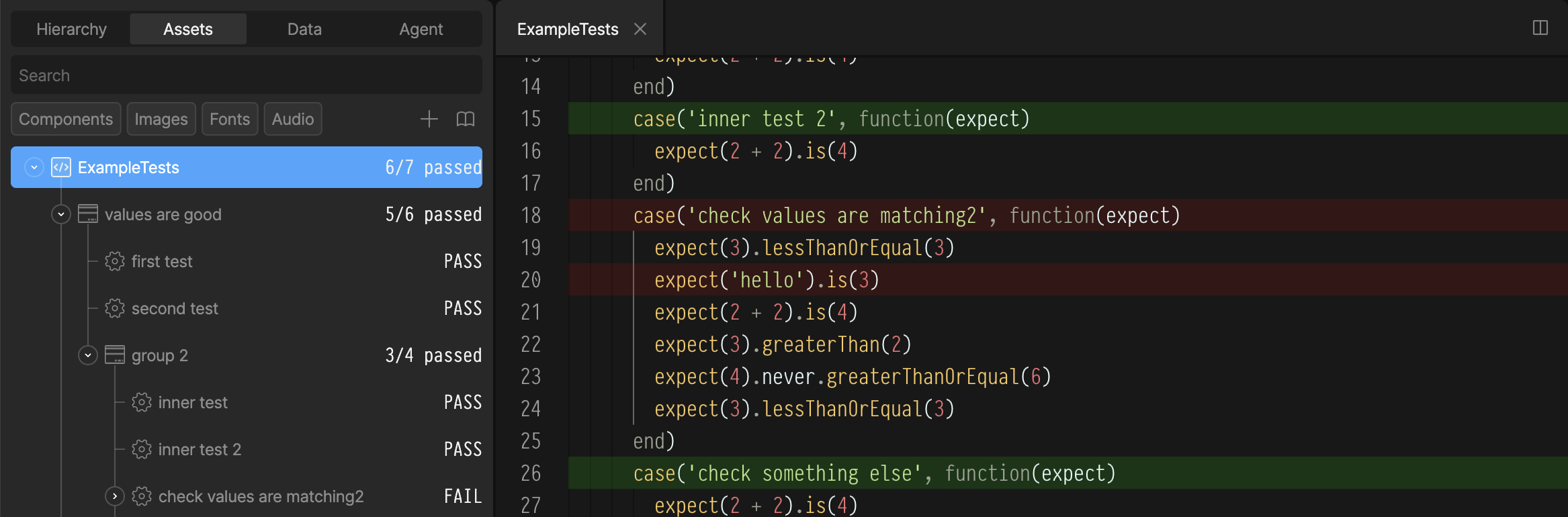
## Running Tests

1. In the Assets panel, right-click your Test script.
2. Select Run Tests.

Test results are shown:

* Passing and failing cases are listed under the script in the Assets Panel
* Passing and failing cases are highlighted in the script editor

<img src="https://mintcdn.com/rive/PNFYxEcCteEOymSI/images/scripting/debugging/test-results.png?fit=max&auto=format&n=PNFYxEcCteEOymSI&q=85&s=62b4b7ff66e47fd13c68d0867bb9bcbc" alt="Problems panel" width="2334" height="770" data-path="images/scripting/debugging/test-results.png" />