> ## Documentation Index
> Fetch the complete documentation index at: https://rive.app/docs/llms.txt
> Use this file to discover all available pages before exploring further.
# AI Agent
> Rive's AI agent helps you write code, design, and animate.
The AI Agent is available with Cadet, Voyager, and Enterprise plans. [Learn more about our plans and pricing](https://rive.app/pricing?utm_source=docs\&utm_medium=content).
Rive's AI agent helps you write code, design, and animate. Generate scripts, responsive layouts, data models, and even animation.
## Getting Started
Open the **Agent panel** from the left sidebar and type a prompt describing what you want.
**Example prompt:**
> Create a script that draws a rounded rectangle.
> Width, height, color, and corner radius should be inputs.
> When the inputs change, the drawing should update.
The Agent will respond with:
* A summary of what it changed
* Any new scripts it created
* Explanations for how the script works
* Suggestions for how to customize it
If a new script is generated, you’ll find it in your Assets panel.
## Toolbar
Use the AI Agent toolbar to manage your conversations:
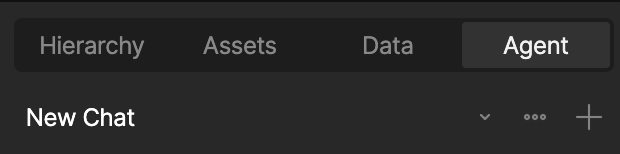 * **New Chat** – Start a new chat thread without losing your past conversations
* **Toggle Chats** – Go back to old chats
* **Close Chat** – Close the chat without losing your history
## FAQ
The AI Coding Agent is billed using AI credits, which are expressed in USD.
$1 in AI credits = $1 USD of AI usage
**What's included per paid seat (monthly AI credits)?**
Each paid seat adds monthly AI credits to your workspace:
* Voyager: \$20/seat/month in AI credits
* Enterprise: \$40/seat/month in AI credits
**AI credit rules**
* Monthly AI credits reset each month and don’t roll over.
* AI credits are shared at the workspace level.
* Monthly credits are always consumed before top-up credits.
* AI credit top-ups don't expire
When your workspace runs out of available AI credits, the agent stops accepting new prompts until:
* Your monthly AI credits reset, or
* You add an AI credit top-up
No. We have a Zero Data Retention policy active with our LLM provider. Neither we nor the provider use user data to train AI models.
Admins on Enterprise workspaces can toggle the AI Coding Agent on or off for the entire workspace at any time.
Yes. Like any AI system, the agent may occasionally generate incorrect or suboptimal code, but it will attempt to self-correct. Always review code generated by the AI Coding Agent.
Yes. Please send feedback to our [Community](https://community.rive.app/).
* **New Chat** – Start a new chat thread without losing your past conversations
* **Toggle Chats** – Go back to old chats
* **Close Chat** – Close the chat without losing your history
## FAQ
The AI Coding Agent is billed using AI credits, which are expressed in USD.
$1 in AI credits = $1 USD of AI usage
**What's included per paid seat (monthly AI credits)?**
Each paid seat adds monthly AI credits to your workspace:
* Voyager: \$20/seat/month in AI credits
* Enterprise: \$40/seat/month in AI credits
**AI credit rules**
* Monthly AI credits reset each month and don’t roll over.
* AI credits are shared at the workspace level.
* Monthly credits are always consumed before top-up credits.
* AI credit top-ups don't expire
When your workspace runs out of available AI credits, the agent stops accepting new prompts until:
* Your monthly AI credits reset, or
* You add an AI credit top-up
No. We have a Zero Data Retention policy active with our LLM provider. Neither we nor the provider use user data to train AI models.
Admins on Enterprise workspaces can toggle the AI Coding Agent on or off for the entire workspace at any time.
Yes. Like any AI system, the agent may occasionally generate incorrect or suboptimal code, but it will attempt to self-correct. Always review code generated by the AI Coding Agent.
Yes. Please send feedback to our [Community](https://community.rive.app/).